Tuesday, 16 December 2014

Tagged under: , ,

5 Must-Have Small Business New Year's Resolutions

Can you believe it's that time of the year again? We say goodbye to yet another year and get planning for a brand new 12 months of business, branding and hopefully growing.

Are these the things that your small business has on its New Year's resolutions list?

Regardless of what you may already be planning for in the upcoming year...here are some things which should be on the list:

1. Be Mobile (and Web) Friendly

Mobile phones and technology is everywhere these days. That means that potential customers are mostly mobile. Majority of us take the time to do product (or service) research before purchasing, and as a small business you have to be ready to provide the best available brand experience before a potential customer even talks to someone from your organization.

What? How is that even possible? It is possible by:

  • Utilizing SEO services to be easily found-able by potential customers
  • Having a connection beyond promotion with targeted audience (social media engagement)
  • Designing a website that is friendly across multiple devices (responsive design)
  • Implementing interactive tools, information and/or web pages which are of value to the customer

2. Listen

When was the last time you've had an actual interaction with a customer online? If you have to stop and think about it, it has been far too long. Instead of just posting updates constantly, take the time to hear your customers out. Has there been a complaint? A positive review? Simple question about the business? Word of mouth recommendation?


Taking the time to genuinely  listen and respond to these customer oriented interactions helps build a more personal connection with your audience. What is wrong with giving a freebie or public acknowledgment to a person who recommended your business to someone else? Absolutely nothing. As a matter of fact it should be encouraged organization-wide.

Now more than ever businesses have the ability to connect to customers on a highly personal level. Make sure you take advantage in the new year if you already have not done so.

3. Promote Less, Converse More

In tune with the point above; instead of sending a lot of updates and waiting for conversations to happen, take initiative and engage in conversations with your customers. Ask questions, join forums, find relevant blogs and take the time to read before you respond to a post. All of this will not only help you build a closer connection with the people who you are trying to reach, but will allow you to gain a better perspective of what they are looking for, what makes them tick, etc.

It shows that you are an active member of the community and are willingly putting in the effort to make a connection beyond just asking users to open their wallets. Here is a report summary outlined by Econsultancy illustrating why personal catering is a smart shift in online focus.

In case you need to determine the difference between promoting and engaging interactions feel free to check out our infographic outlining the difference between two types of communications.

4. Become More Efficient

How often do you get caught up in catching up on work or falling behind on goals? Probably far too often (as we all do). A major part of your businesses New Year's resolutions should be to find ways to do work more efficiently. Whether that would involve introducing a CRM system, new machines or simply improving a menial task.

Automation solutions are infiltrating the small business workplace and can be very beneficial in streamlining certain business functions. While there are many automation systems for marketing, payroll, etc. they are not always the ultimate problem solver as portrayed. This is best outlined by a quote from Bill Gates:
The first rule of any technology used in a business is that automation applied to an efficient operation will magnify the efficiency. The second is that automation applied to an inefficient operation will magnify the inefficiency.
Therefore implement efficient ways of operating (or working) your small business and any future investments will be just as efficient (or inefficient).

5. Learn Something New

Learning should never stop, regardless how many diploma's or post-secondary education credentials you may hold. With such a rapid advancement of technology, business practices and communication
we all need to constantly learn how to get better.

Whether you decide to do official certifications or simply attend a webinar on a specific topic, make sure you find a list of learning tools that will help you discover something unknown in the new year.

Tuesday, 2 December 2014

Tagged under: , ,

Helpful Small Business Phone Apps: Communication

Similarly to majority of small business owners I too rely on my mobile device for getting things done. Finding the right small business phone apps to help manage finances, increase productivity or simply help stay on top of things is not as easy as it seems. Here is a list of great communication apps that can help you make the most of your mobile device (information & ratings based on Android OS):

Viber


Device Availability: Android, Blackberry, iPhone, Microsoft, Desktop
Cost: FREE
Download Size: 31.68MB
Rating: 4.5/5

My favourite communication of all: it allows to instant messaging (IM), video calls, non-video calls and basically anything else you can think of! Best thing about it? It's FREE. There are no premium versions of updates. The only thing that costs more money would be purchasing stickers (smiley faces) and emoticons that go beyond their basics (they have a VERY LARGE selection of basic emoticons).

I usually use this app to call contacts in Europe and across Canada without any issues. At times there are call-quality issues but in reality that depends on your data or WiFi connection. As soon as I experienced bad quality I would move to a more "signal friendly" location and the call would pick right up.

BBM (Blackberry Messenger)


Device Availability: Android, Blackberry, iPhone
Cost: FREE
Download Size: 23.12MB
Rating: 4.5/5

Alright - BlackBerry (formerly Research in Motion) has taken a lot of flack for not developing their OS over the last couple of years, as their financial performances indicates. However, since the company reshuffled their leadership the mobile device maker is now back in business and one of the first order of businesses was to expand their reach.

BBM is now available for iPhone and Android (use to be exclusive to BlackBerry) and is now developed beyond just IM options: it includes calling, collaboration, group creation and much, much more. It is free of cost and the quality of messaging/talking is great (pending connection of course).

Downfall? On the Android device the BBM icon always shows up in your notification bar (not sure why they have done it this way) and the messages can take sometimes longer to show up as a notification. Once I lock my phone, the message takes a while to come up after a contact sends it while other communication apps are nearly instant.

Still a fantastic communications app for small businesses. Plus a lot of people would appreciate BlackBerry's extra privacy and security options as they have their own encryption and do not allow outside access. This makes sharing of private data and information much safer and easier.

Skype


Device Availability: Android, Blackberry, iPhone, Microsoft, Desktop
Cost: FREE
Download Size: 19.41MB
Rating: 4.5/5

Since Microsoft's takeover of Skype in 2011, the VoIP software has really developed into an all-device solution from its original desktop-only availabiltiy. While we now have to use our Outlook emails or accounts to login; the calls and IM options are still available with great quality.

Outside of Viber, this is the 2nd most used app here at NR Digital Branding and having great quality (no lagging voice or video) with conference calls to Europe we would definitely recommend it.

Skype also offers premium paid telephone and conferencing (more users to attend call, file sharing, etc.) in case you need it, but if you're OK with one to one video conferencing give Skype a shot.

UberConference


Device Availability: iPhone, Android
Cost: FREE
Download Size: 5.32MB
Rating: 4.5/5

UberConference is not too well-known among conference apps but it does a great job of making mobile conferencing simple and easy. App is easy to understand, has the capability to include up to 10 participants, quality of video is high, social media integration and call recording.

The makers also offer premium options at a price, but the basic version has more than enough of capabilities if you're hosting a conference call for 10 or less people. For conference heavy professionals who are constantly on the go this app will provide a great way to stay connected, free of cost!

Did we miss a great app? Let us know which application helps you stay connected on the go.

Wednesday, 12 November 2014

Tagged under: , , , , ,

Semantic SEO: Going Beyond Keywords With Rich Snippets & Structured Data Markup

What is Semantic SEO?

It is not a fancy new term to throw small businesses off guard and get duped into "higher fees for more services" by their marketing freelancers offering professional SEO services or worse yet, for full-time marketing employees to create further confusion than already exists surrounding search engine optimization.


It is a fairly new feature which basically increases the focus on the RELATIONSHIP between keywords and terms instead of solely focusing on each of them individually. So instead of ranking for a 1-2 keyword, semantic search attempts to grab multiple keywords from a page, article, blog, etc. and make meaning of it so that the best possible information is presented in the SERP (search engine results page - the results page after you hit the search button).

Not only does it attempt to understand multiple keywords but it also looks for other signals for meaning, signals such as rich snippets and data mark up which we discuss (and outline of how to use) below.

Why is Semantic SEO important?

For a number of reasons; main being that content marketing is becoming increasingly visual and having information for not only the audience but for search engines to make sense of videos, images, blog posts, guides, ebooks, etc. The more accurately and cleanly you describe and present all the information that is published online, the better chance it has to rank higher. Plus having a rich snippet such as a 5 star rating come up for your local business or product increases click-thru rates (CTR), meaning you will be getting more visitors to your website.

How To Setup Rich Snippets & Structured Data Markup?

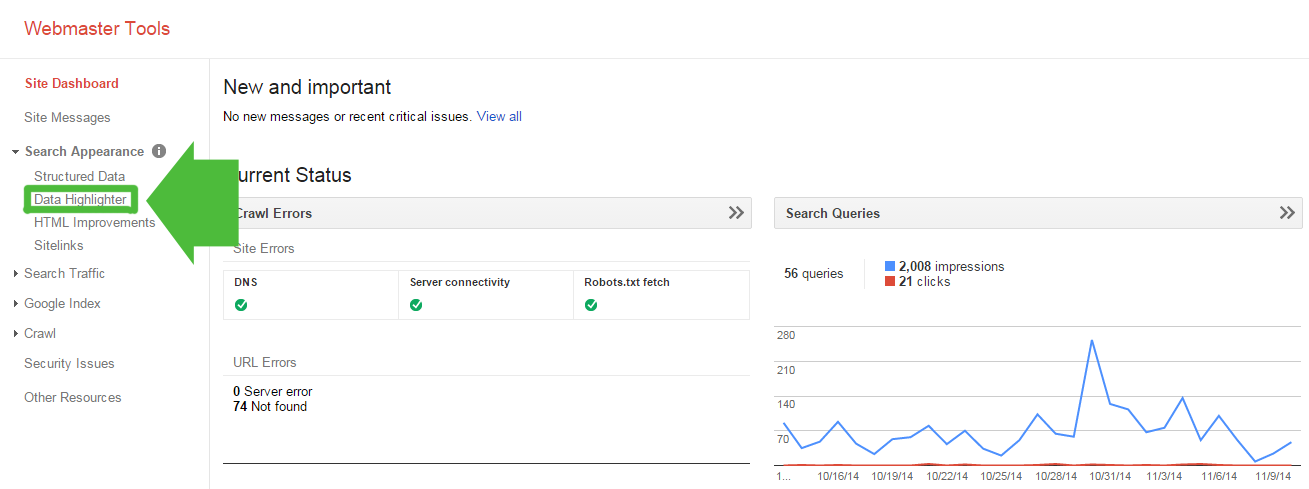
Luckily Google has made it super easy for webmasters to setup rich snippets via Google Webmaster Tools. If you navigate to Search Appearance -> Data Highlighter you will be able to follow along the step-by-step outline below.

Click to enlarge.
NOTE: Before you do so, make sure that the page or piece of content has all the necessary information before using the data highlighter tool. 
So before we get started here is a list of rich snippets ( and their details) which the Data Highlighter recognizes. Keep in mind that not all of the details are required, but the more information you have the better the optimization:

1. Articles

  • Title (required)
  • Author
  • Date Published
  • Image
  • Category
  • Average Rating (Rating, Votes)

2. Books Reviews

  • Title (required)
  • Image
  • Author
  • Date Published
  • Publisher
  • In language
  • Genre
  • ISBN
  • Average Rating (Rating, Votes)
  • Review (Reviewer, Review Rating, Review Date)

3. Events

  • Name (required)
  • Date (required)
  • Location (Venue, Address - required)
  • Image
  • Official URL
  • Category
  • Performer
  • Ticket (Type, Price)

4. Local Businesses

  • Name (required)
  • Address (required)
  • Telephone (required)
  • Opening Hours
  • Category
  • Department (Name, Telephone, Opening Hours)
  • Image
  • URL
  • Average Rating (Rating, Votes)
  • Review (Reviewer, Reviewer Rating, Review Date)

5. Movies

  • Name (required)
  • Image
  • Director
  • Screenplay By
  • Actor
  • Date Released
  • Genre
  • MPAA Rating
  • Duration
  • Official URL
  • Average Rating (Rating, Votes)
  • Review (Reviewer, Reviewer Rating, Review Date)

6. Products

  • Name (required)
  • Image
  • Pricing (Price - required, Availability)
  • Product ID
  • Average Rating (Rating, Votes)
  • Review (Reviewer, Review Rating, Review Date)

7. Restaurants

  • Name (required)
  • Address (required)
  • Telephone (required)
  • Opening Hours
  • Cuisine
  • Image
  • URL
  • Reservation URL
  • Menu URL
  • Average Rating (Rating, Votes)
  • Review (Reviewer, Reviewer Rating, Review Date)

8. Software Applications

  • Name (required)
  • Image
  • Price
  • Category
  • Publisher
  • Official URL
  • Download URL
  • Operating System
  • Date Published
  • Software Version
  • Average Rating (Rating, Votes)
  • Review (Reviewer, Reviewer Rating, Review Date)

9. TV Episodes

  • Series Name (required)
  • Episode name
  • Season Number (required)
  • Episode Number (required)
  • Image
  • Director
  • Actor
  • Air Date
  • Official URL
  • Average Rating (Rating, Votes)
  • Review (Reviewer, Reviewer Rating, Review Date)

Article Data Highlighter Example

Let's assume you have the information and category of rich snippets in place. I will focus on an Article (or blog post) in this guide since blogs are the most common piece of content small businesses create. 

Once you've clicked to the data highlighter option you will see the screen below. Click on the "Start Highlighting button:
Click to enlarge.
A pop-up comes up asking you for the URL of the article (NOTE: must be the same domain as the website which you've setup in Google Webmaster Tools):


There are two options at the bottom: to highlight this article and all others similar to it, or just this article. I will choose this article for the example, but if you have multiple articles or posts which follow the same format it might save you time to select the other option!

When you hit the "OK" button the actual page will show up with the highlighter information on the right hand side:
Click to enlarge.
From here it's simply highlighting the information and selecting where it belongs:


One you are finished, click the "Publish" button and the structured data should show up:
Click to enlarge.

What to do when the information you want to highlight is not on the page?

Sometimes all of your information will NOT be readily visible on the actual blog post (or page). In that case navigate to the top right corner and click on the gear (settings button), then select "Add missing tags":

Click to enlarge.
A new window will open up where you can select the tag of your choice and manually add in the information:

That is it - you've setup article rich snippets! 

For actual examples of how they actually show up on search engine results, HubSpot has put together a great post on rich snippets you can check out.

A couple of things to keep in mind:

Will you be adding rich snippets to your web pages or content?